How do I access the grant reporting system?
Grant reports are located in the online application system (GrantsConnect). The Community Foundation has transitioned to the new online portal where applications and grant reports are submitted. CLICK HERE TO ACCESS.
If you have an outstanding grant report that was due prior to 1/1/2026, only the grant report will be accessible on the new portal. Grant applications submitted on our legacy portal do not transfer over. You will not be able to view your legacy grant application on the new portal.
What if the prior account holder is no longer with my organization?
Please email The Community Foundation's grant reporting staff for your online application site credentials to be transferred to your organization’s new authorized account holder.
Recommendation: When submitting your grant application, we recommend you use a shared email account that can be accessed by multiple staff members within your organization such as grants@yourorganization.org.
Add others to edit/receive notifications (See “Can other individuals in my organization edit, access, and receive notifications on status of forms?” in the FAQ).
Can other individuals in my organization edit, access, and receive notifications on status of forms?
Yes, to add individuals to your report form, click the report form, then scroll down to “Manage applicants”. Here you can see who has access to the forms and where you can add, delete, or change permission of individuals working on the form.
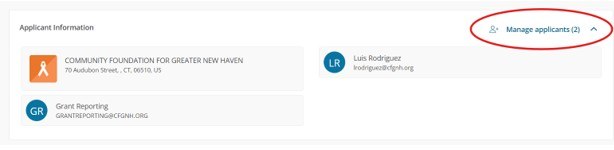
Click on “Manage applicants”, type the email and name of the person you want to have access to the form, then click “Add’’. You can change the permissions of each person you added. Click the pencil icon to change permissions. Finally, click “Create”.
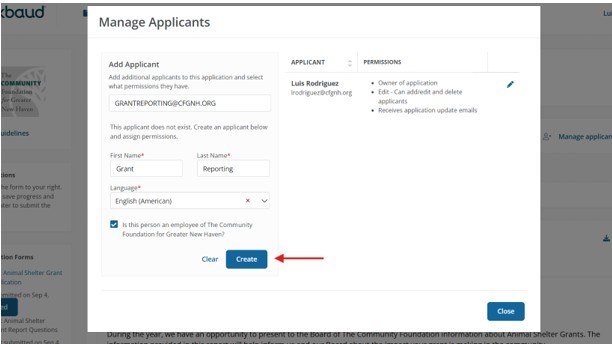
Anyone added to the application is required to create an account. An automated email with instructions will be sent to the desired email for account creation and access.
How can I reset my password?
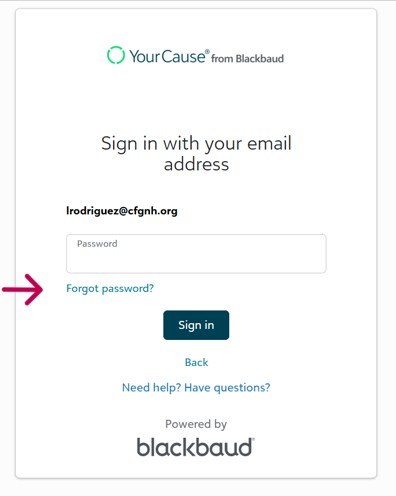
Click “Continue” then “Forget Password” on the sign in page. Check your email spam/junk folder if your password reset email does not appear in your inbox.
Recommendation: Change your password regularly, especially when staff members with access to the account leave your organization.
How do I view my grant report?
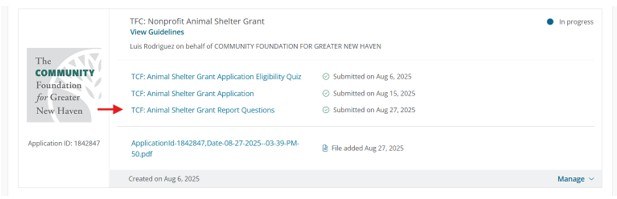
Once you are logged into the account that has access to the application, click on the form that reads “Report Questions”. Please check the name of the report form you click on is the correct grant process. For example, if you want to fill out the report form for a past Small Grant, Click “Small Grants Report Questions”.
If you are still unable to view your report, please email the grant reporting staff.